
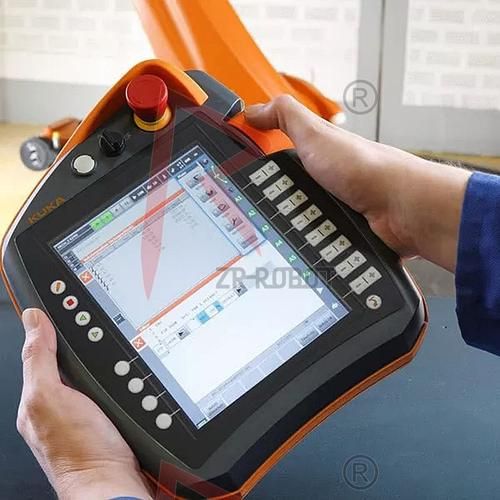
Yes, you can calibrate most handheld digital multimeters at home or in a *** all lab if you follow the correct sequence and use certified reference sources.
Why calibration matters more than you think
A multimeter that has drifted by only 0.5 % on the 10 A range can cause a lithium-cell charge circuit to miss its cutoff, leading to thermal runaway. **Periodic calibration keeps both safety margins and warranty claims under control.**
Pre-check: is your meter even calibratable?
- Service manual availability: Look for a PDF on the manufacturer’s support page; if it lists “CAL” or “ADJ” modes, you are good to go.
- Hardware access: Some models hide trim-pots under the battery cover, others require removing the case. **Do not proceed if doing so voids the warranty you still need.**
- Reference uncertainty budget: Your reference source (voltage, current, resistance) must be at least four times more accurate than the meter’s published spec.
Tools and environment checklist
- Traceable voltage source: 0–10 V DC calibrator with ≤0.02 % uncertainty.
- Precision shunt resistor: 0.1 Ω, 0.01 % tolerance for current verification.
- Four-wire resistance standard: 1 Ω, 10 Ω, 1 MΩ set.
- Temperature-stable workspace: 23 °C ±2 °C, <50 % RH, away from air vents.
- Shorting plug & low-thermal emf leads.
Step-by-step calibration workflow
Step 1 – Enter calibration mode
Power off the meter, hold the “RANGE” button while turning the rotary switch to “V DC”. Release when the display shows “CAL”. **If your model uses a hidden tactile switch, press it with a plastic spudger to avoid ESD damage.**
Step 2 – Zero the DC voltage range
Connect the input terminals with the shorting plug. When the meter prompts “0.000 V”, press “HOLD” to store the offset. **This removes internal amplifier drift and thermoelectric voltages.**
Step 3 – Apply reference voltages
Disconnect the short, connect the calibrator set to 1.0000 V. Wait for the reading to stabilize (usually 5 s). Press “HOLD” again. Repeat for 5.0000 V and 9.0000 V. **Use the same polarity for all points; do not switch to negative until the positive segment is complete.**
Step 4 – Calibrate the current ranges
Move the red lead to the 10 A jack. Connect the calibrator in current-source mode through the precision shunt. Source 1.000 A, allow thermal settling, then store. **Watch the shunt temperature; if it rises above 40 °C, pause and let it cool to prevent resistance shift.**

Step 5 – Resistance calibration
Switch to “Ω” and select the 200 Ω range. Use the four-wire method: connect the 1 Ω standard, wait for the reading, store. Repeat for 10 Ω and 1 MΩ. **Four-wire eliminates lead resistance errors that can exceed 0.1 % on lower ranges.**
Step 6 – Exit and lock the calibration
Rotate the switch to “OFF”. On power-up, the meter should display “PASS” or remain silent; any “FAIL” message indicates a step was skipped or the reference was out of tolerance. **Record the date and environmental conditions in the logbook; ISO 17025 auditors love traceable notes.**
Common pitfalls and quick fixes
- Display jumps by ±3 counts after calibration
- Cause: Residual charge on the input capacitor.
Fix: Short the inputs for 10 s before taking critical measurements. - Current reading 0.5 % high only on 10 A range
- Cause: Shunt temperature coefficient not accounted for.
Fix: Recalibrate at 25 °C or apply a temperature correction factor from the shunt’s data sheet. - Cannot enter CAL mode
- Cause: Firmware revision locked calibration.
Fix: Check the manufacturer’s site for a firmware update utility; some brands unlock CAL only after a paid license key.
How often should you repeat the process?
For meters used daily on production lines, **a 12-month interval is typical**. For occasional hobby use, extend to 24 months unless you notice drift during routine checks. High-precision bench meters may need 90-day cycles if they are part of a measurement standard chain.
DIY vs. accredited lab: cost–benefit snapshot
| Scenario | DIY Cost (USD) | Lab Cost (USD) | Uncertainty Achieved |
|---|---|---|---|
| Hobby-grade DMM (0.5 %) | 150 (calibrator rental) | 45 | ±0.05 % vs ±0.03 % |
| 6½-digit bench meter | 2 000 (reference multimeter) | 250 | ±15 ppm vs ±5 ppm |
If your application demands **ISO 9001 traceability**, the lab route is non-negotiable; otherwise, a careful DIY calibration is perfectly adequate.
Quick verification between full calibrations
- Daily: Short the inputs in V DC mode; reading should be within ±2 counts of zero.
- Weekly: Measure a fresh 1.5 V alkaline cell; expect 1.58–1.62 V when new.
- Monthly: Check a 1 % tolerance 10 kΩ resistor; log the deviation trend.
When any of these checks drift beyond **one-third of the meter’s specification**, schedule a full calibration.
评论列表